
Apple Locks macOS Full Disk Access: AI Agent Fix
Apple tightened macOS Full Disk Access controls due to AI agent risks. Here's which business workflows break, what to audit now, and how to adapt your automation.
Apple Just Changed the Rules for macOS AI Automation
An AI agent is running on a MacBook in your operations team. It reads emails, pulls contract drafts from the file system, cross-references them with CRM data, and flags anomalies before a human ever opens the thread. It was granted Full Disk Access during setup — a single toggle in System Settings — and nobody thought twice about it. That was the standard onboarding flow for half a dozen desktop AI tools your team installed over the past year.
On October 2, 2026, Apple announced it is tightening controls around that exact permission. The company named autonomous AI agents as the direct cause — the first time a major operating system vendor has updated core access permissions specifically because of agentic software, not malware or nation-state threats. What this means for your macOS-based automation stack, which workflows are now in a legal and security grey zone, and what your IT team needs to do before the new controls ship — that's what this article unpacks.
What Full Disk Access Actually Is — and Why AI Agents Changed It
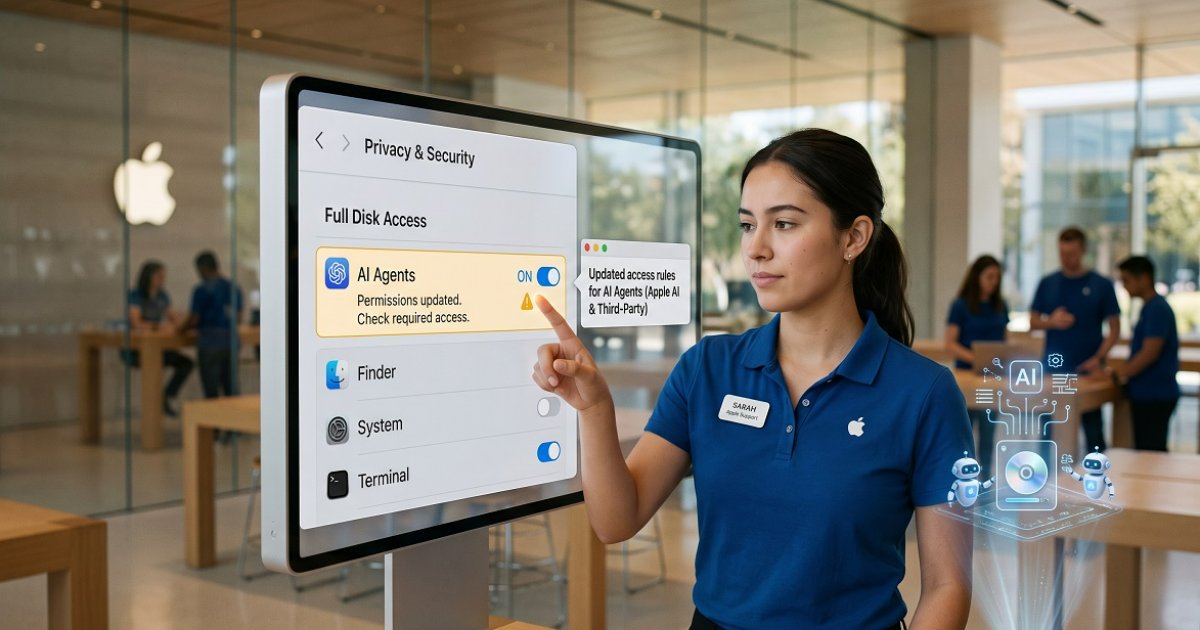
Full Disk Access (FDA) is a macOS permission that lives under Privacy & Security in System Settings. Apple introduced it in macOS Mojave (version 10.14) to solve a specific, narrow problem: backup utilities like disk-cloning tools needed to read every file on a system — including protected locations like Mail, Messages, Safari data, and Time Machine archives — to do their job properly.
The permission works by bypassing Apple's standard TCC (Transparency, Consent, and Control) framework. Normally, TCC gates access to sensitive resources on a per-app, per-resource basis — Camera, Microphone, Photos each require separate approval. Full Disk Access is a master key. When an application holds it, that app can reach Mail, Messages, Safari history, contacts, photos, and system backups without any further prompts.
For a backup utility running once a night, that's a manageable risk. The user's mental model is simple: the tool needs to see everything to copy everything.
AI agents broke that mental model entirely.
A permission granted to an app becomes permission for a much wider chain of inference, action, and data transfer — because agents don't just read files, they interpret them, act on them, and pass context between tools.
Desktop AI agents — tools like always-on desktop assistants from various AI providers — are not passive readers. They interpret information, make decisions, take actions, and relay context across integrations. When such an agent holds Full Disk Access, it doesn't just see your backup folder. It sees your entire communications history, every draft document, every browser session. And as Apple noted in its developer announcement, for communication apps this exposure extends to the privacy of everyone the user is communicating with — not just the user themselves.
Apple put it plainly in its developer post: some developers are using Full Disk Access "in ways that could put users at risk, exposing everything on their systems — including files, mail, messages, and even browsing history — without users' full knowledge and understanding." The company added that as AI agents become increasingly capable and autonomous, "the risks associated with this level of access will grow substantially."
Which Business Workflows Are Now at Risk
This is not a theoretical concern. If your organization runs macOS-based AI agents for any of the following scenarios, you need to assess your exposure now.
Document and Contract Automation
AI agents that draft, review, or route contracts often need access to file directories where legal documents are stored. Many were set up with Full Disk Access as the path of least resistance — it's simpler than configuring granular folder permissions for each integration. Once Apple's new controls ship, those agents may require re-authorization through a more deliberate user action. If that re-authorization doesn't happen, the agent breaks silently or degrades to partial functionality.
Email and Communication Triage
Agents that monitor inboxes, categorize messages, or trigger workflows based on email content rely on access to Mail data. Full Disk Access is the bluntest way to grant that. Under the new regime, this access will require explicit, informed user consent — which means your IT team needs to know which agents currently hold FDA and whether that access is genuinely necessary or just the default from a lazy setup.
Compliance and Audit Workflows
Some compliance automation tools on macOS read system logs, communication records, and file metadata to generate audit trails. These are exactly the categories Apple is flagging. If your compliance agent holds Full Disk Access and your legal team hasn't formally signed off on that scope of access, you may already have a governance gap — regardless of what Apple does next.
Internal Knowledge Agents
Agents built to surface institutional knowledge — reading through internal wikis, past project files, archived emails — are particularly exposed. The breadth of access they need is real, but so is the risk if that access is misconfigured or if the agent's underlying model passes context to external APIs. This is the scenario Apple's announcement is most directly addressing.
The question isn't whether your AI agents need broad access. Some genuinely do. The question is whether that access was granted deliberately, documented, and scoped — or just clicked through during a demo.
What Apple Is Actually Changing (and What It Isn't)
It's worth being precise here, because early coverage of this announcement overstated the change. Apple is not banning Full Disk Access for AI agents. It is not technically blocking any app from requesting or receiving the permission. No macOS version number or rollout date has been announced as of this writing.
What Apple is changing is the consent mechanism. Going forward, users who want to grant an app Full Disk Access will need to do so through "very explicit user action" — a deliberate, unambiguous step rather than a standard permission prompt. The goal, Apple stated, is to ensure users "clearly understand these risks before granting such access, so they can make informed decisions about their own data and privacy."
Apple has also not clarified whether existing Full Disk Access grants will be reset when the new controls ship, or whether apps that currently hold the permission will be grandfathered in. That ambiguity alone is reason enough to audit your stack now rather than wait.
One more nuance: this is not a rule aimed exclusively at AI agents. Apple's warning covers any developer using Full Disk Access broadly — AI agents are named as the reason the risk profile is escalating, not as the only category affected.
The Business Security Audit You Should Run This Week
The practical response isn't to panic or to rip out your automation stack. It's to get ahead of the change with a structured audit. Here's the sequence that matters.
Step 1: Inventory Every App Holding Full Disk Access
Open System Settings → Privacy & Security → Full Disk Access on every Mac in your organization that runs automation or AI tooling. Document every app listed there. This is your exposure map.
For most mid-sized organizations, this list will be longer than expected. Backup tools, endpoint security agents, and AI assistants often accumulate FDA grants over time, and nobody revokes them when the original use case changes.
Step 2: Classify by Necessity
For each app on your list, ask one question: does this application genuinely need access to Mail, Messages, Safari history, and system-wide files — or was FDA granted because it was the easiest path during setup?
Backup utilities and endpoint security tools typically have a legitimate case. AI agents that only need access to a specific project folder or a designated data directory almost certainly do not need the full master key. Revoke FDA for any agent where the access scope exceeds the actual workflow requirement, and reconfigure using folder-level permissions or dedicated API integrations instead.
Step 3: Review Your Agent Architecture for Least-Privilege Design
If you're running custom-built AI agents — whether on LangChain, CrewAI, AutoGen, or a proprietary stack — this is the moment to review whether your architecture was designed around least-privilege principles from the start. An agent that needs to read contracts should have access to the contracts directory, not the entire file system. An agent that monitors email should connect through a mail API with defined scopes, not through a system-level permission that also exposes Messages and browsing history.
This is a design discipline, not just a compliance checkbox. Agents built with proper multi-agent architecture tend to be more resilient to platform-level permission changes precisely because they don't rely on blunt system permissions as a shortcut.
Step 4: Document and Formalize What Remains
For any agent that genuinely requires broad file system access after your review, create a formal record: what the agent accesses, why, who approved it, and what data handling controls are in place. This documentation matters for two reasons. First, it prepares you for the re-authorization flow Apple will introduce. Second, it closes the governance gap that many organizations currently have — AI agents operating with permissions that were never formally reviewed by legal, compliance, or IT security.
Step 5: Monitor for the macOS Update
Apple has not announced a release date or a specific macOS version for the new controls. Subscribe to Apple's developer news feed and assign someone to track the rollout. When the update ships, you want to be in a position to re-authorize legitimate agents immediately — not scrambling to figure out which tools broke and why.
How to Redesign macOS Automation Workflows for the New Reality
The deeper strategic response is to treat this moment as a forcing function for better automation architecture — not just a compliance task.
The pattern that created this problem is common: an AI agent is deployed quickly, granted the broadest available permission to make setup frictionless, and then left running indefinitely. That works until the platform changes the rules. The alternative is to build automation workflows where each agent has precisely the access it needs, no more.
In practice, this means several things:
- Use API-based integrations over system-level permissions wherever possible. An email agent that connects through Microsoft Graph API or Google Workspace API has a defined, auditable scope. An agent that reads Mail via Full Disk Access has none.
- Separate agents by function and data domain. A procurement agent should not share a permission context with a communications agent. Compartmentalization limits blast radius when any single component is misconfigured or compromised.
- Build re-authorization into your deployment process. Treat permission grants as something that expires and requires periodic review, not a one-time setup step.
- Test workflows against restricted permissions before the macOS update ships. Revoke FDA from your AI agents in a staging environment and see what breaks. Better to find out now than when the update rolls out to production machines.
For organizations building more sophisticated agentic systems, the cost and architecture decisions behind custom AI agent development become directly relevant here — because the upfront investment in proper permission scoping pays for itself the first time a platform-level change like this one doesn't break your operations.
Security-conscious leaders should also note that macOS Full Disk Access is not the only permission surface where AI agents are creating new risk vectors. Prompt injection — where malicious content in a document or email manipulates an agent's behavior — is a related threat that deserves parallel attention, particularly for agents with write access to business-critical systems. The risk of prompt injection in AI agents handling financial data is a concrete example of why permission architecture and input validation need to be designed together, not treated as separate concerns.
The executives who get this right — who can walk into a board meeting and explain exactly which AI agents have access to what data, why, and under what governance framework — are the ones who will be seen as building AI-powered operations that are genuinely enterprise-grade, not just impressive in a demo. That's the difference between being the leader who adopted AI and the leader who built something that scales without creating liability.
When your automation stack survives a platform-level permission change without a single broken workflow, you'll feel exactly what good architecture is supposed to deliver: not excitement, but calm. The quiet confidence that comes from knowing your systems were built to last, not just to launch.
Frequently Asked Questions
Does Apple's announcement mean AI agents will lose Full Disk Access immediately? No. Apple has not announced a rollout date or a specific macOS version for the new controls. Existing Full Disk Access grants are not being revoked today. The change, when it ships, will affect how users grant the permission going forward — requiring more deliberate, explicit action rather than a standard prompt.
Which AI agent tools are most affected by this change? Any desktop AI agent that currently relies on Full Disk Access to read Mail, Messages, Safari data, or broad file system directories is affected. This includes always-on desktop AI assistants and any custom-built automation tools that were configured with FDA as a shortcut during setup.
Can businesses still use AI agents on macOS after this change? Yes. Apple is changing the consent mechanism, not banning AI agents from requesting or receiving Full Disk Access. Agents that genuinely need broad system access can still obtain it — users will simply need to grant it through a more deliberate process. The practical impact is on agents that were granted FDA without clear justification, which may not survive a re-authorization flow.
What's the difference between Full Disk Access and standard file permissions on macOS? Standard file permissions let an app access specific files or folders a user explicitly selects. Full Disk Access bypasses Apple's per-app TCC framework entirely, giving an application unrestricted read access to protected system locations — Mail, Messages, Safari history, Time Machine backups — without any further prompts. It's a master key, not a door to a specific room.
Should we wait for Apple to release the update before auditing our agents? No. The audit is valuable regardless of when the update ships. Knowing which agents hold Full Disk Access, whether that access is justified, and whether your governance documentation covers it are things your organization should know now — both for the upcoming macOS change and for your broader AI security posture.
Does this affect macOS-based agents built on frameworks like LangChain or AutoGen? Yes, if those agents were deployed with Full Disk Access granted to the host application. The framework itself doesn't determine the permission level — the macOS app that runs the agent does. If your custom agent runs inside an application that holds FDA, that application will be subject to Apple's new consent requirements.
The macOS Full Disk Access change is a signal, not just a policy update. It marks the moment when operating systems started treating autonomous AI agents as a distinct risk category — different from utilities, different from traditional software, and requiring different permission boundaries. That shift will not stop at Apple. Every platform your business runs automation on will eventually face the same question: how much access should software that acts on your behalf actually have?
The organizations that answer that question proactively — with documented, scoped, auditable agent permissions — will be the ones that treat every future platform change as a routine update rather than a crisis. Start with the audit. Then redesign the architecture. If you want to map out what that looks like for your specific automation stack, talk to our AI automation team.
Have questions? Ask the AI agent right now
Responds in seconds, knows everything about our services and will help with your situation
You might also like
AI Agents in SMS & Messengers: Sales Playbook
AI agents living inside SMS and messengers are reshaping sales and support. Real business scenarios, ROI estimates, step-by-step setup guide, and key risks.
AutomationGemini 3.8 Live Avatar: Video Agents for Business
Google's Gemini 3.8 Live with Live Avatar brings real-time video agents to enterprise. See how video AI transforms customer service, training, and sales.
AutomationHow to Choose an AI Agent Vendor: Business Checklist
A practical checklist for CEOs and COOs on how to choose an AI agent development vendor — with red flags, key criteria, and a real case with numbers.