
RAG vs CAG: Which AI Architecture Fits Your Business
RAG vs CAG explained for business leaders: how each architecture works, when to use which, and a real case with numbers to guide your AI decision.
RAG vs CAG: The Architecture Decision Most AI Projects Get Wrong
Until recently, "add a vector database" was the default answer to almost every enterprise AI question. A team needed an internal knowledge assistant? RAG. A customer support bot? RAG. A compliance checker? RAG. The pattern was so dominant that most projects never paused to ask whether retrieval was actually necessary — they just started building the pipeline.
That assumption is now worth challenging. The same context-window expansion that quietly reshaped what LLMs can hold in memory has made a simpler, faster, and often cheaper architecture viable for a wide class of business problems. The question is whether your specific knowledge base is one of them — and the answer has direct consequences for your infrastructure costs, response latency, and the engineering hours your team will spend maintaining the system for the next two years.
The debate between RAG and CAG isn't really a technical argument. It's a business architecture decision dressed in engineering clothes. Get it right, and your AI system is faster, cheaper, and easier to maintain. Get it wrong, and you're paying for complexity you don't need — or, worse, building something too simple for the problem it's supposed to solve.
What RAG and CAG Actually Do (Without the Jargon)
Both approaches solve the same fundamental problem: a large language model only knows what it was trained on. Your company's internal knowledge — product specs, compliance rules, SOPs, pricing tables — wasn't in that training data. So you need a way to get that knowledge into the model's hands at the moment it answers a question.
RAG and CAG are two different answers to that same question.
How RAG Works
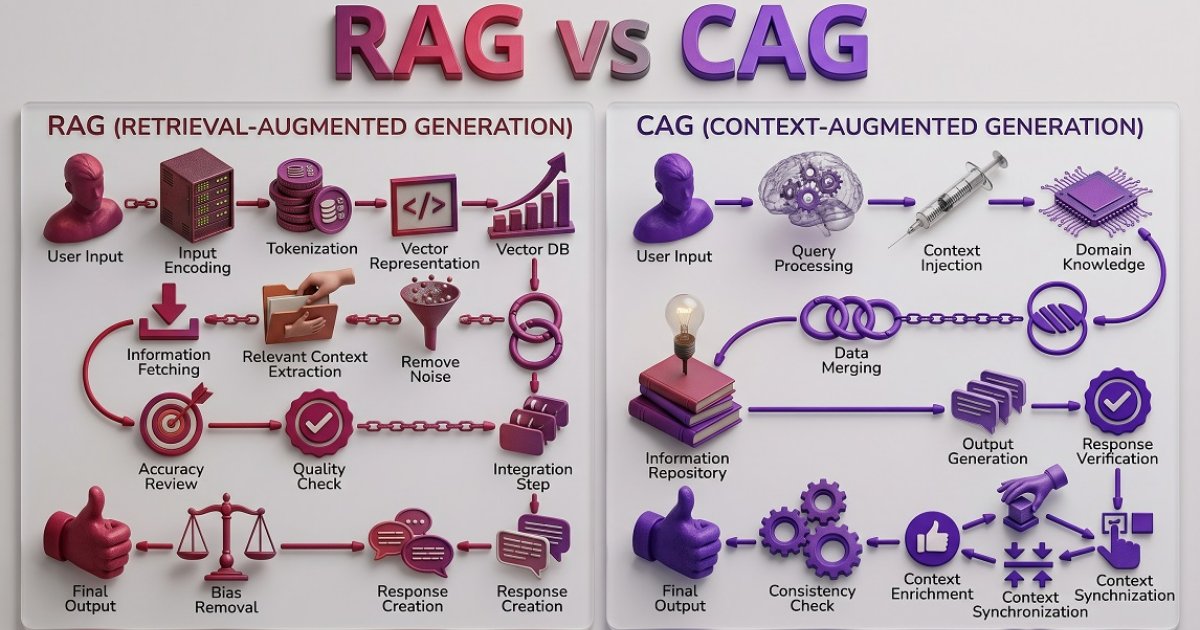
Retrieval-Augmented Generation treats your knowledge base like a library. When a user asks a question, the system searches the library in real time, pulls the most relevant documents, and hands them to the model along with the original question. The model reads what was retrieved and generates an answer.
The pipeline looks like this:
- User submits a query
- The query is converted into a vector embedding (a mathematical representation)
- A similarity search runs against a vector database containing your indexed knowledge
- The top-ranked chunks are retrieved
- Those chunks are appended to the prompt
- The LLM generates a response grounded in the retrieved content
A concrete example: A pharmaceutical company maintains a continuously updated database of clinical trial results, drug interaction records, and regulatory submissions — tens of millions of documents that grow every week. When a medical affairs team member asks "what are the contraindications for compound X in patients with renal impairment?", the system searches in real time, retrieves the three most relevant trial summaries, and generates a grounded answer. No human could read the full corpus; retrieval is the only practical option.
RAG is powerful when your knowledge base is large, constantly updated, or too big to fit anywhere else. A legal research platform pulling from millions of statutes and case filings, a financial institution that needs live market data in its answers — these are RAG's natural home.
The tradeoff: RAG adds infrastructure. You need a vector store (Pinecone, Weaviate, pgvector, or similar), an embedding pipeline, a retrieval layer, and often a reranker to improve result quality. Each of those components can fail, drift, or surface the wrong document. Retrieval errors propagate directly into the model's output.
How CAG Works
Cache-Augmented Generation — formally introduced in December 2024 by researchers Brian J. Chan, Chao-Ting Chen, Jui-Hung Cheng, and Hen-Hsen Huang in their paper "Don't Do RAG: When Cache-Augmented Generation is All You Need for Knowledge Tasks" — takes a fundamentally different approach. Instead of searching at query time, it preloads the entire relevant knowledge base into the model's context window before any user interaction begins.
The pipeline is simpler:
- Curate and prepare your knowledge documents
- Load them into the LLM's context window (and optionally cache the resulting KV state)
- At query time, the model already has everything it needs — no retrieval step required
- Generate the answer directly from preloaded context
A concrete example: A mid-sized insurance company has a 400-page policy manual, a standard FAQ covering 300 common customer questions, and a set of underwriting guidelines that updates quarterly. The entire corpus fits comfortably in a modern context window. Rather than building a retrieval pipeline, the team preloads the full knowledge base once. Every agent query — "does policy type B cover flood damage in a basement?" — gets answered in under half a second, with no retrieval layer that could surface the wrong clause.
The key enabler is the dramatic expansion of context windows in modern LLMs. Two years ago, most models could handle a limited number of tokens. Today, models like Gemini 1.5 Pro and Claude support context windows of 1 million tokens or more. A knowledge base that once would have required a full retrieval pipeline can now simply be loaded in.
The question isn't which architecture is better. It's which one matches the shape of your knowledge.
The original research showed that CAG achieved competitive results compared to both sparse and dense RAG methods on standard benchmarks — because when the full context is already present, the model can't retrieve the wrong thing. CAG eliminates retrieval latency, removes the vector database from your stack, and sidesteps the entire class of errors that come from imperfect document retrieval.
The constraint is equally clear: your knowledge base has to fit in the context window, and it has to be stable enough that preloading doesn't go stale before the next refresh.
Side-by-Side: RAG vs CAG at a Glance
Before working through the decision framework, it helps to see both architectures compared directly across the dimensions that matter most to a business decision-maker.
| Dimension | RAG | CAG |
|---|---|---|
| How it works | Retrieves relevant documents at query time from an external store | Preloads the full knowledge base into the model's context before queries arrive |
| Knowledge base size | Unlimited — scales to millions of documents | Bounded by the model's context window (up to ~1M tokens in frontier models) |
| Knowledge freshness | Always current — retrieves live data on every query | Requires a refresh cycle when knowledge changes |
| Update frequency fit | Daily or real-time updates | Monthly or quarterly updates |
| Response latency | Higher — embedding + search + reranking adds time | Lower — no retrieval step, goes straight to generation |
| Infrastructure complexity | High — vector store, embedding pipeline, retrieval layer, reranker | Low — no vector database required |
| Risk of retrieval error | Present — wrong chunks can propagate into the answer | Eliminated — the full context is always available |
| Cost profile | Higher per-query cost (embedding + search compute) | Higher upfront context load; lower per-query cost |
| Best for | Large, dynamic, or unpredictable knowledge bases | Bounded, stable, well-defined knowledge domains |
| Typical use cases | Legal research, live market data, clinical trial databases, real-time inventory | Internal SOPs, product FAQs, policy manuals, compliance frameworks |
Use this table as a first filter. If your situation maps cleanly to one column, the decision is already made. If it maps to both — some knowledge is stable, some is live — you're looking at a hybrid, which the final section covers.
The Decision Framework: Four Questions to Ask Before You Build
Neither architecture is universally superior. The right choice follows directly from the nature of your knowledge and your operational requirements. Work through these four questions before your team writes a single line of code.
Question 1: How large is your knowledge base?
This is the first filter. If your knowledge base — product catalog, internal SOPs, compliance documentation, HR policies — can be expressed in fewer than a few hundred thousand tokens, CAG is worth serious consideration. If you're dealing with millions of documents, a constantly growing corpus, or data that spans multiple domains, RAG is the only practical option.
A useful mental benchmark: if your entire knowledge base would fit in a long PDF that a human expert could read in a day, it probably fits in a modern context window.
Question 2: How frequently does your knowledge change?
CAG requires a refresh cycle. Every time your knowledge base changes, you need to reload the context (and re-cache the KV state if you're using that optimization). If your data changes daily or in real time — live inventory, current pricing, breaking regulatory updates — that refresh overhead becomes a liability. RAG retrieves fresh data on every query by design.
If your knowledge changes quarterly, monthly, or even weekly, CAG's refresh cost is manageable. If it changes by the hour, RAG is the right tool.
Example: A logistics company's route optimization rules and carrier contracts update twice a year. That's a CAG-friendly refresh cadence. The same company's live shipment tracking data changes by the minute — that goes through RAG.
Question 3: How predictable are your queries?
CAG works best when you can anticipate the shape of what users will ask. If 90% of your queries fall within a well-defined domain — "what's our return policy," "what are the specs for product X," "what does clause 7 of our standard contract say" — preloading that domain gives the model everything it needs.
RAG earns its complexity when queries are unpredictable, cross-domain, or require synthesizing information from documents that can't be known in advance.
Example: A manufacturing company's maintenance technicians ask predictable questions about specific machine models — torque specs, error codes, maintenance intervals. The equipment manuals are stable and bounded. CAG handles this cleanly. The same company's procurement team asks open-ended questions that span supplier databases, commodity price feeds, and regulatory filings from multiple jurisdictions — that's RAG territory.
Question 4: What does latency cost you?
CAG responses are faster. Without a retrieval step, the model goes straight to generation. For customer-facing applications where response time directly affects satisfaction — a support chatbot, a sales assistant, an internal helpdesk — that speed difference is measurable and meaningful. For back-office analytical tasks where a two-second delay is irrelevant, it matters less.
Speed isn't just a user experience metric. In high-volume support environments, a 1.5-second reduction in average response time translates directly into throughput — more queries handled per hour, fewer escalations, lower staffing pressure.
A Real Case: What Happens When You Switch
The architecture choice has direct financial consequences. Consider a mid-sized retailer that had built its customer service AI on a full RAG pipeline. Every incoming support query — including routine questions about shipping times, return windows, and product dimensions — triggered a live search through the product database. The retrieval was accurate, but it was also expensive: each query incurred embedding computation, vector search, and reranking costs.
The team audited their query logs and found that roughly 80% of all incoming questions could be answered from a stable, bounded knowledge set: the FAQ, the return policy, the product spec sheets for their top 200 SKUs. That knowledge fit comfortably within a modern context window.
They migrated that 80% of query volume to a CAG architecture, keeping RAG only for the remaining 20% — queries about live inventory, current promotions, and order status that genuinely required real-time retrieval. The result: operational costs for the AI system dropped by approximately 60%, and average response latency fell from around two seconds to under half a second for the majority of queries. The engineering team, freed from tuning retrieval quality for routine questions, redirected that time toward improving the RAG layer for the genuinely dynamic use cases.
That's not a story about CAG beating RAG. It's a story about matching architecture to the actual shape of the problem — and the financial leverage that comes from getting that match right.
The executives who made that call didn't just cut costs. They walked into their next board meeting with a concrete story: AI infrastructure spend down 60%, response quality up, engineering capacity redirected to higher-value work. That's the kind of decision that changes how a leadership team is perceived — not as people who adopted AI because it was fashionable, but as operators who understood it well enough to make it work harder. Investors and boards increasingly distinguish between those two categories. The architecture decision is one of the clearest signals of which one you are.
And there's something quieter that happens on the other side of that decision: the operational anxiety that comes from a system that's expensive, slow, and hard to explain goes away. When your AI infrastructure is right-sized, you stop firefighting and start steering. That shift — from reactive to deliberate — is what control over operations actually feels like.
Hybrid Architecture: When You Need Both
For many mid-sized and large businesses, the most practical answer isn't a binary choice — it's a tiered system that routes queries intelligently based on their characteristics.
The pattern works like this:
- Core, stable knowledge (product specs, internal policies, standard procedures, regulatory frameworks that update quarterly) → preloaded via CAG for instant response
- Dynamic, real-time knowledge (live inventory, current market data, recent regulatory changes, order status) → served through RAG with live retrieval
Retail example: A consumer electronics retailer preloads product specifications, warranty terms, and FAQ content via CAG for its customer support assistant. The same assistant uses RAG to fetch current stock levels and active promotions. Customers get sub-second answers on product questions; the system still handles "is this in stock at my nearest store?" accurately.
Manufacturing example: Equipment manuals and safety procedures — content that rarely changes — live in the CAG layer. Supply chain disruptions and regulatory updates, which can shift daily, go through RAG. Maintenance technicians get instant answers on the shop floor; procurement gets current data when they need it.
Professional services example: A consulting firm preloads its methodology frameworks, standard contract templates, and internal knowledge base via CAG. Client-specific data, live regulatory filings, and current market research flow through RAG. Senior consultants get fast answers on internal process questions; client-facing analysis draws on live sources.
The routing logic doesn't have to be complex. A simple classifier that categorizes incoming queries as "stable domain" or "dynamic domain" is often sufficient. What matters is that the decision is made deliberately, based on the actual characteristics of your data — not defaulted to one architecture because it's what the team already knows.
For a deeper look at how structured knowledge systems can power this kind of intelligent routing, the piece on Knowledge Graph AI: How It Runs Your Business is worth reading alongside this one.
Frequently Asked Questions
What is the main difference between RAG and CAG? RAG retrieves relevant documents from an external knowledge base at query time and passes them to the model. CAG preloads the entire relevant knowledge base into the model's context window before any queries arrive. RAG is better for large, dynamic knowledge; CAG is better for smaller, stable knowledge that fits within the model's context limit.
When should a business choose CAG over RAG? CAG is the stronger choice when your knowledge base is bounded in size, changes infrequently (monthly or quarterly rather than daily), and the majority of your queries are predictable and fall within a well-defined domain. It's also preferable when response latency is a priority and you want to minimize infrastructure complexity.
Does CAG replace RAG entirely? No. CAG is a complement to RAG, not a replacement. For knowledge bases that are too large to fit in a context window, or that update in real time, RAG remains the only practical option. Many production systems use both: CAG for stable, high-frequency query types and RAG for dynamic or unpredictable information needs.
What context window size do I need for CAG to be viable? It depends on the size of your knowledge base. Modern frontier models — including Gemini 1.5 Pro, Claude 3.5, and GPT-4o — support context windows ranging from 128,000 to over 1 million tokens. A 128K-token window can accommodate roughly 90,000–100,000 words of text, which covers a substantial FAQ, a full product catalog for a focused line, or a complete set of internal SOPs for most departments.
What are the main risks of CAG? The primary risks are context staleness (if the knowledge base changes and the context isn't refreshed) and context length degradation (some models show reduced accuracy when operating near the top of their context limit). Both are manageable with proper refresh scheduling and knowledge base curation, but they require deliberate operational discipline.
Is a hybrid RAG/CAG system difficult to build? The core complexity is in the query routing logic — deciding which queries go to the CAG layer and which trigger RAG retrieval. The routing itself can be as simple as a keyword classifier or as sophisticated as a small intent-detection model. The underlying components (a preloaded context for CAG, a vector store for RAG) are well-supported by existing frameworks like LangChain and LlamaIndex.
The real skill here isn't picking a side. It's running the audit: how large is your knowledge base, how often does it change, and what does your query distribution actually look like? Most businesses that default to RAG for everything haven't asked those questions. Some of them are running expensive retrieval pipelines on knowledge bases that would fit in a single context window.
Once you have those answers, the architecture choice becomes obvious — and so does the business case. If you're building or evaluating an AI system right now, compare your own situation against the framework above. The decision you make at the architecture level will determine your costs, your latency, and your maintenance burden for years. It's worth getting right before the first line of code is written.
For teams thinking about how to measure and justify the investment either way, the AI ROI Framework: Prove Business Value article lays out a practical approach to building that case.
Have questions? Ask the AI agent right now
Responds in seconds, knows everything about our services and will help with your situation
You might also like
Qwen3Guard: Real-Time AI Content Safety
Alibaba's free open-source Qwen3Guard filters toxic tokens in real time. Here's how SaaS teams and CTOs can deploy it to protect LLM-powered products.
Technical GuidesYour Corporate Data in Claude Leaked to Google
Claude's Shared Chats and Artifacts turned out to be indexed by Google. We break down what business data leaks through AI — and how to close these gaps.
Technical GuidesClaude Opus 5: New Rules for Business AI Agents
Claude Opus 5 launched on July 24, 2026, and broke the old logic of agent design. A practical checklist for teams already running Claude in production.